S3List
Description
Enables you to list files in an Amazon S3 bucket.
info
- Ensure that you have a properly configured Amazon Web Services (S3) connection resource set up under the Resources folder.
- S3 file names are case-sensitive; therefore, abc.JPG, abc.jpg, and ABC.jpg will be saved as different files. To ensure consistency, we recommend using lower-case file names and extensions: abc.jpg.
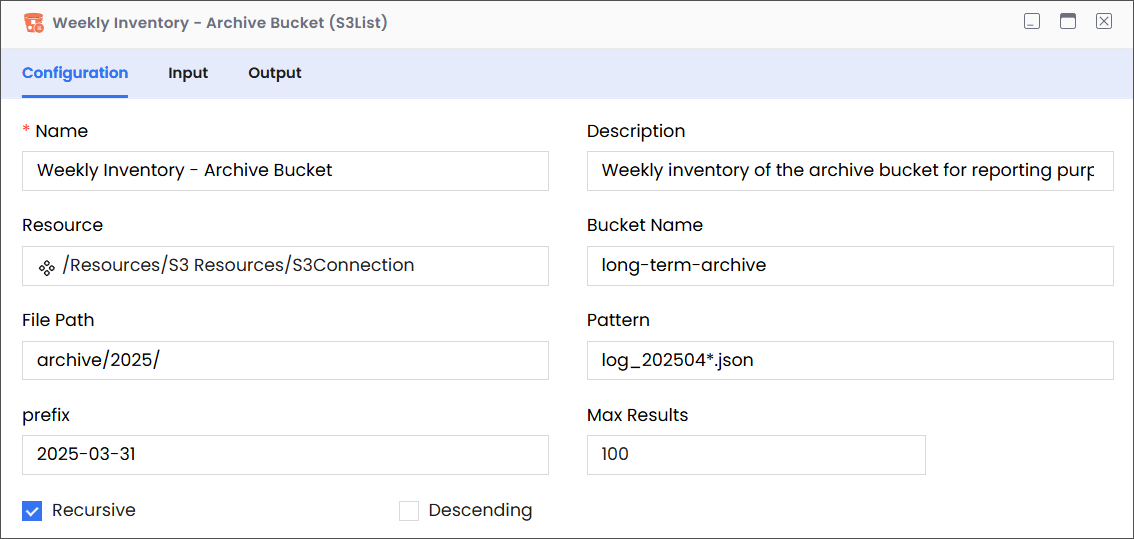
Configuration
| Field | Required | Description | Example |
|---|---|---|---|
| Name | Required | The name of the activity. This name must be unique in a workflow. | Weekly Inventory - Archive Bucket |
| Description | Optional | The description of the activity. We recommend you make this as clear as possible to guide execution, foster understanding, and support collaboration. | Weekly inventory of the archive bucket for reporting purposes. |
| Resource | Required | A predefined resource for accessing S3 buckets. | /Resources/S3 Resources/S3Connection |
| Bucket Name | Required | The name of the bucket that contains the files that you want to list. | long-term-archive |
| File Path | Required | The path within the specified S3 bucket that leads to the folder containing the files that you want to list. Note While entering the file path, only list the virtual directories without adding the bucket name, because the it is already specified (see Bucket Name, above). | For example, consider the following complete path:
In this complete path:
|
| Pattern | Optional | An optional pattern (e.g., using wildcards like * or ?) to further filter the listed files based on their names within the specified bucket and prefix. This allows targeting files with specific naming conventions. | log_202504*.json |
| Prefix | Optional | Lists files whose names begin with the specified prefix. | 2025-03-31 |
| Max Results | Optional | Specifies the maximum number of file listings to retrieve in a single request. This can be useful for managing large buckets and processing results in batches. | 100 |
| Recursive | Optional | Instructs the application to retrieve matching files recursively from subdirectories. | Deselected |
| Descending | Optional | Instructs the application to display results in alphabetically descending order. | Deselected |
Input
| Field | Required | Data Type | Description | Example |
|---|---|---|---|---|
| filepath | Optional | String | The path to the bucket (without the bucket name) that contains the file that you want to delete. | archive/2025 |
| pattern | Optional | String | The file pattern that you want to use to filter the list of files in the target bucket. | log_202504*.json |
| prefix | Optional | String | The prefix that you want to use to identify files to be listed from the specified file path. | 2025-03-31 |
| maxResult | Optional | Number | The maximum number of search results that you want to be returned at a time. | 100 |
| recursive | Optional | Boolean | Instructs the application to retrieve matching files recursively from subdirectories, if true. | FALSE |
| descending | Optional | Boolean | Instructs the application to display results in alphabetically descending order, if true. | FALSE |
Output
| Field | Required | Data Type | Description | Example |
|---|---|---|---|---|
| schema | Required | NA | A custom schema that can be imported. | NA |
| files | Required | Array | The returned array containing the list of matching files in the destination bucket. | NA |
| files > path | Required | String | The path to the file. | archive/2025/long-term-archive |
| files > name | Required | String | The name of a file in the returned array. There must be at least one item in this list for the List call to be successful | raw/sensor-data/part-0001.json |
| files > size | Required | Number | The size of the file (in bytes). | 2500 |
| files > createdTime | Required | String | The date-time when the file was created. | 2025-03-10T19:20:30+01:00 |
| files > lastModified | Required | String | The date-time when the file was last modified. | 2025-03-15T09:10:30+01:00 |
| files > permissions | Required | String | Permissions associated with the file. | Read, write, delete or manage files |
| files > properties | Required | String | Properties associated with the file. | content-type |
| files > directory | Required | Boolean | Indicates a child directory. | True |
| totalFiles | Required | Number | Indicates the number of files in the target bucket. | 23 |