S3Delete
Description
Enables users to delete a specific file from an Amazon S3 bucket from within a workflow.
info
- Ensure that you have a properly configured Amazon Web Services (S3) connection resource set up under the Resources folder.
- S3 file names are case-sensitive; therefore, abc.JPG, abc.jpg, and ABC.jpg will be saved as different files. To ensure consistency, we recommend using lower-case file names and extensions: abc.jpg.
Configuration
| Field | Required | Description | Example |
|---|---|---|---|
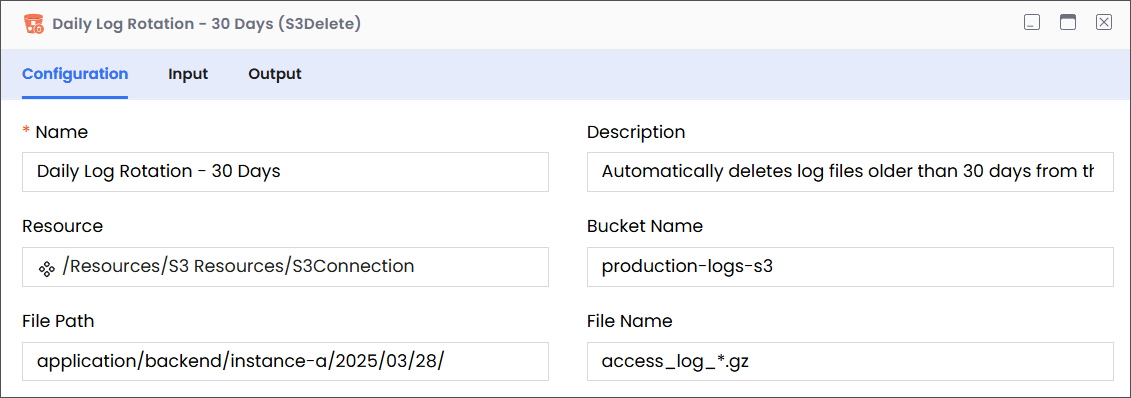
| Name | Required | The name of the activity. This name must be unique in a workflow. | Daily Log Rotation - 30 Days |
| Description | Optional | The description of the activity. We recommend you make this as clear as possible to guide execution, foster understanding, and support collaboration. | Automatically deletes log files older than 30 days from the production log bucket. |
| Resource | Required | A predefined resource for accessing S3 files. | /Resources/S3 Resources/S3Connection |
| Bucket Name | Required | The name of the S3 bucket where the activity will target files. | production-logs-s3 |
| File Path | Required | The path within the specified S3 bucket that leads to the folder containing the file to be deleted. Note While entering the path, only include the virtual directories without adding the bucket name, because the buck name is already specified (see Bucket Name, above). | For example, consider the following complete path:
In this complete path:
|
| File Name | Required | The name of the file(s) that you want to delete. | access_log_*.gz |
Input > Target
| Field | Required | Data Type | Description | Example |
|---|---|---|---|---|
| filepath | Optional | String | The path to the bucket (without the bucket name) that contains the file that you want to delete. | application/backend/instance-a/2025/03/28 |
| filename | Optional | String | The name of the file that you want to delete. | access_log_*.gz |
Output
| Field | Required | Data Type | Description | Example |
|---|---|---|---|---|
| JSON Schema | Optional | NA | A custom schema that can be imported. | NA |